The combat loop
All · 20 min read · No code
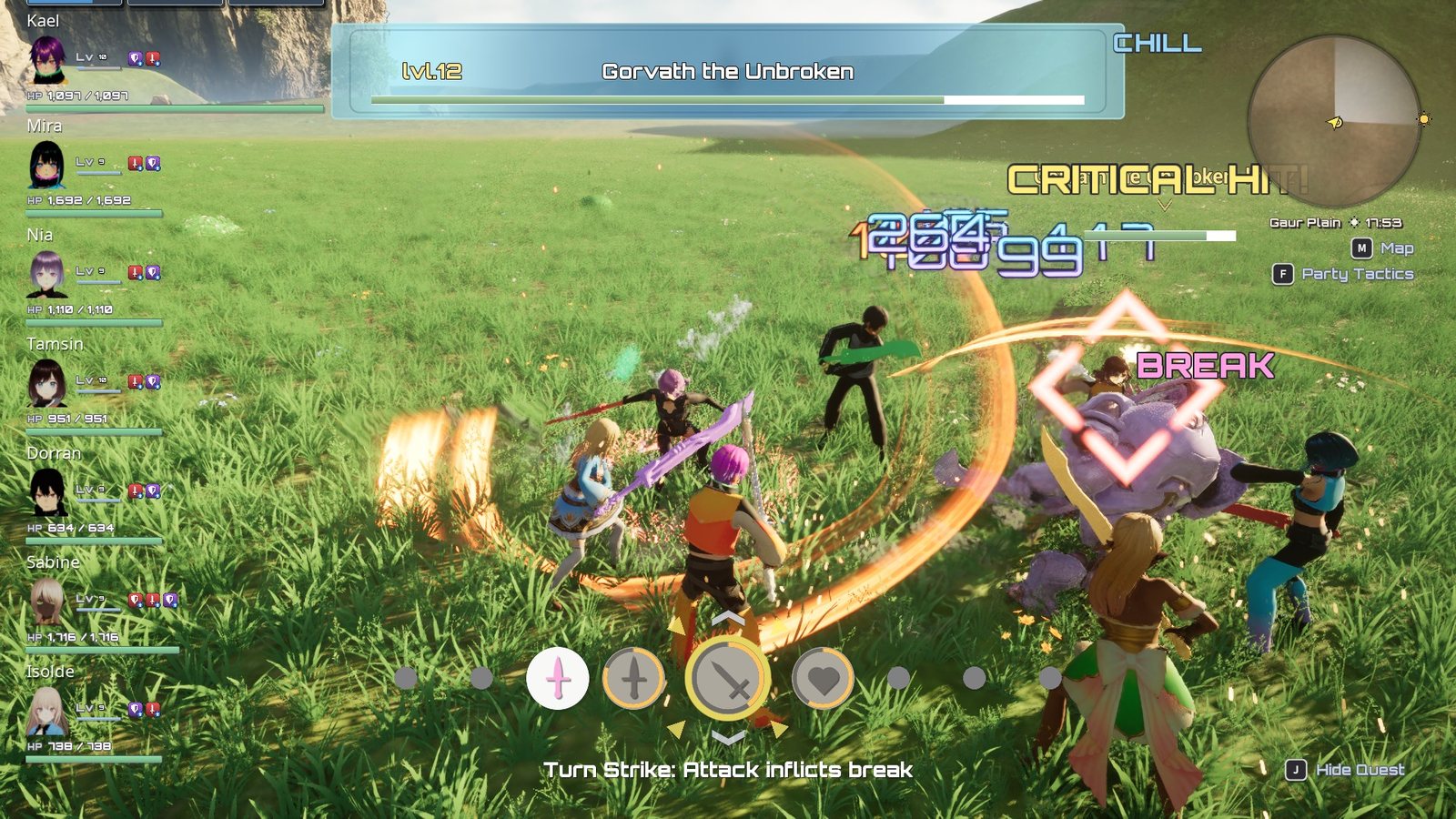
Break lands on the target; the Arts palette sits at the bottom, the party plates on the left.
A fight is a chain of gameplay abilities talking through gameplay tags and events. Nothing is
a central "battle manager". Target mode starts the fight on the player's side, drawing the weapon puts
the party in battle, the auto-attack swings on its own while the target is in reach, and each landed
hit sends the victim an event it reacts to. The one idea: Status.XenoCore.InBattle on the leader
means "the party is fighting", and the party AI, the HUD, the animation layers and the Party screen
all read that one tag.
At a glance
In play: lock on, the party draws and auto-attacks; hits flinch and push the target; misses dodge, blocks guard; when the last enemy falls the party sheathes and celebrates.
What you can change, no code:
- Swing reach, speed and clips: Tune auto-attack
- Shake, rumble, numbers and the critical line: Add hit feedback
- Knockback, flinch, guard and dodge clips: What you can change and Give a character its own combat animations
- Block and hit chances: Stats and damage
How it fits together
| Stage | Ability or asset | Tag it holds |
|---|---|---|
| Lock on | Battle/Targeting/GA_XenoCore_TargetMode |
Status.XenoCore.TargetMode |
| Draw / sheathe | Battle/GA_XenoCore_Arm_v2 |
Status.XenoCore.Arming while playing; toggles Status.XenoCore.InBattle |
| Auto-attack | Battle/GA_XenoCore_AutoAttack (UXenoCoreGameplayAbility_AutoAttack) |
Ability tag Ability.XenoCore.AutoAttack |
| Damage | Battle/Attributes/GE_XenoCore_Damage |
Fires the cue GameplayCue.XenoCore.DamageTaken |
| Talent charge | Battle/Attributes/GE_XenoCore_TalentCharge |
Fills Talent Gauge |
| Flinch | Battle/GA_XenoCore_Player_HitReact (UXenoCoreGameplayAbility_HitReact) |
Triggered by XenoCore.Event.HitReact |
| Guard (you blocked) | Battle/Defence/GA_XenoCore_Guard (UXenoCoreGameplayAbility_GuardReact) |
Triggered by XenoCore.Event.Combat.Block; holds Status.XenoCore.Defence.Guard |
| Recoil (you were blocked) | Battle/Defence/GA_XenoCore_Recoil (UXenoCoreGameplayAbility_RecoilReact) |
Triggered by XenoCore.Event.Combat.Blocked; holds Status.XenoCore.Defence.Recoil |
| Dodge (you evaded) | Battle/Defence/GA_XenoCore_Evade (UXenoCoreGameplayAbility_EvadeReact) |
Triggered by XenoCore.Event.Combat.Evade; holds Status.XenoCore.Defence.Evade |
| Swing and hit feel | GameplayCues/GCN_XenoCore_Swing, GCN_XenoCore_Hit |
GameplayCue.XenoCore.Swing, .Hit |
| Battle text | UXenoCoreBattleNotifySubsystem + UserInterface/HUD/W_XenoCore_BattleNotify |
Message XenoCore.Battle.Message.Notification |
| Numbers | Lyra's number pop + UXenoCoreDamageNumberSubsystem |
See below |
The player's and party members' abilities come from Game/AbilitySet_XenoCore_Hero and
Characters/Party/AbilitySet_XenoCore_PartyMember, plus the shared Game/AbilitySet_XenoCore_Input
for every button-driven ability. Arts are a separate system layered on this loop:
see Arts and Reactions and statuses.
Lifecycle
1. Engagement
- The player presses Target Next (R bumper). That sends
XenoCore.Event.SwitchTarget, which starts target mode on the nearest enemy near the centre of the screen and brings up the battle HUD: target badge, player plate and arts palette. See Targeting. - An enemy wanders or patrols near home until it is attacked or it notices the party
by its Detection (sight, sound of running, or a nearby ether art; a passive enemy only reacts to
being hit). If it belongs to a spawner's squad, the rest of the squad joins in. It then chases
whichever party member holds the most aggro on it, which may be a companion. An enemy
Ignore When Levels Below (
6) or more levels below the leader never notices the party, but still fights back when hit. Outrun it and it gives up, heals and walks home. See Targeting and Enemies and AI. - Companions join in when the leader carries
Status.XenoCore.InBattle, or when an enemy near the party is already fighting one of them. Each draws its weapon where it stands, a short random moment after the fight starts, and only then closes in. What they attack follows the party tactics (by default the leader's target). See Companion AI.
Locking on is not the same as fighting. Status.XenoCore.TargetMode means a target is selected;
Status.XenoCore.InBattle means the weapon is drawn.
2. Drawing the weapon
Choosing Attack (or an art) on the palette draws the weapon first. GA_XenoCore_Arm_v2 plays the
draw montage and flips Status.XenoCore.InBattle on its way. The weapon actor moves from back to hand
on the frame marked by the AN_XenoCore_WeaponHandoff notify in the montage.
- While the draw plays, the ability holds
Status.XenoCore.Arming. The flinch ability refuses to run under that tag, so a hit during the draw still does damage but cannot interrupt it. - The draw stops movement (
Gameplay.MovementStopped); the sheathe does not. - The same ability toggles, so it is only ever asked to run when the tag says the state is wrong.
The one-time camera ease towards the target happens here, when the fight starts.
3. The auto-attack loop
The auto-attack is one long-running ability, not one ability per swing:
- It waits until the weapon is drawn (Requires Arming).
- If the target is within Attack Range, it plays the next montage from Attack Montages (or Attack Montages Stationary when standing still), at Montage Play Rate, and plays the swing cue.
- The montage's
UXenoCoreAnimNotify_GameplayEventfiresXenoCore.Event.MeleeHiton the contact frame. Only then is the hit resolved: reach is re-tested (with Contact Reach Tolerance), the hit roll is made, and on a hit the damage effect, the talent charge and any Additional Effects are applied. - The next swing is scheduled from the montage's length plus Swing Recovery.
- If the target is out of range it pauses and re-checks every Out Of Range Retry seconds. It does not end.
Moving does not stop the loop. A full-body swing is handed back to the legs if you start moving (Cancel Full Body On Move).
Fails silently: a swing that never hurts
Damage happens only on the montage's gameplay-event notify. An attack montage with no
XenoCore.Event.MeleeHit notify plays its animation and deals no damage, with nothing logged.
Every montage in Attack Montages needs that notify on its contact frame.
Fails silently: an enemy that never swings
Requires Arming must be off for anything that has no draw ability. Enemies are not granted
GA_XenoCore_Arm_v2, so with it on they wait for a draw that never comes.
4. A landed hit
When a swing connects, in this order:
- Contact roll. The swing misses, is blocked, or hits. A miss shows MISS over the target, makes it dodge, and stops here. Out-of-reach at contact is also shown as a miss. A block shows BLOCKED and carries on with the changes described in Blocks and dodges.
- Damage, through the damage execution. See Stats and damage.
- Talent charge: the attacker's Talent Charge Per Hit is added to its own Talent Gauge.
- Riders: the ability's Additional Effects, such as a reaction or a debuff. Each effect's own application requirements decide whether it takes (which is how Break → Topple → Daze is ordered).
- Hit feel:
GameplayCue.XenoCore.Hit(camera shake and controller rumble). - Flinch and knockback:
XenoCore.Event.HitReactis sent to the victim, which plays a directional additive flinch on theAdditiveHitReactslot and is knocked back, straight away from the attacker, by its hit-react ability's Push Distance x the attack's Force Multiplier. The flinch layers over whatever the victim is doing, so as in XC1 an ordinary hit never cuts off an attack or an art: only a reaction such as Topple or Daze does. The victim does not react while drawing, using an art, Toppled or Dazed, and then it is not pushed either. A blocked hit sends no flinch: the victim guards instead, and is not pushed. This works both ways: an enemy's hits knock the player back. Untick Flinch On Hit on a hit-react ability to drop the flinch animation; the knockback still applies. Set Push Distance to0to drop the knockback. ⚠️ A flinch montage must be additive and on theAdditiveHitReactslot, and that slot must be registered on the character's skeleton in its own slot group (AdditiveGroup). A normal montage, or an unregistered slot, puts the flinch in the attack's slot group and it cuts the swing off again. See Add a new enemy for a new skeleton.
Arts aimed at enemies make the same contact roll for every hit and every target, and every hit flinches and knocks back the same way, using the Art's own Force Multiplier. See Arts.
Blocks and dodges
Blocking and dodging are rolls, not buttons. When a hit is blocked or misses, both bodies react on their own:
| Outcome | The defender | The attacker |
|---|---|---|
| Blocked | Plays its guard (GA_XenoCore_Guard), and takes no damage by default |
Recoils (GA_XenoCore_Recoil) for about 0.65 s |
| Missed | Ducks or sidesteps, picked at random each time (GA_XenoCore_Evade) |
Nothing more: the swing simply whiffs |
While a guard, recoil or dodge plays, the character:
- cannot move (
Gameplay.MovementStopped); - does not auto-attack:
Status.XenoCore.Defenceis in the auto-attack's Incapacitated Tags, so the loop pauses and a swing already in flight does not connect; - cannot use an Art:
TagRelationships_XenoCoreblocksAbility.XenoCore.ArtonStatus.XenoCore.Defence.
A block also changes the hit itself:
- No Topple. A blocked hit skips any rider that would Topple. Break still lands.
- A blocked Art ends. The recoil cancels the attacker's Art, so the rest of a multi-hit Art never lands.
A party member's duck and sidestep play on the Defence slot of ABP_XenoCore_Base. While the
weapon is drawn, the body and legs come from the clip but the arms stay in the weapon stance, so the
hands never leave the sword's grip. With the weapon sheathed, the clip's own arms play. Both clips move
the character with root motion: the duck steps back and the sidestep moves to the side, even straight
after a swing made on the move.
The minion has its own copies (Characters/Enemies/Minion/GA_XenoCore_Minion_Guard, _Recoil,
_Evade), because it is on its own skeleton (SK_Minion_Core) and its clips are retargeted from the
player's. The minion's dodge is still the directional one: it moves away from the attacker.
5. Hit feedback: which side plays it
Camera shake and rumble need a local player controller. So the attacking ability plays
GCN_XenoCore_Hit on whichever side has one: on the attacker when you hit an enemy, and on you
when an enemy hits you.
Fails silently: shake and rumble from a damage effect
A cue triggered by a Gameplay Effect has no player controller to find, so camera shake and force feedback on a GE-driven cue never play (sparks and sounds still do). Put anything that shakes the camera or rumbles the pad on a cue your ability executes itself, the way the auto-attack does.
No rumble on keyboard
Lyra only plays force feedback when the current input device is a gamepad and the player's
setting allows it. To test with a keyboard, use the console command
LyraPC.ShouldAlwaysPlayForceFeedback 1.
6. Numbers and battle text
| What | Who draws it |
|---|---|
| Damage the party deals (yours and every ally's) | XenoCore's damage cue GameplayCues/GCNL_XenoCore_DamageTaken (a copy of Lyra's), through B_XenoCore_NumberPopComponent, DamagePopStyle_XenoCore and NS_XenoCore_DamageNumbers. A critical hit draws gold. |
| Damage you take | UXenoCoreDamageNumberSubsystem, drawing NS_XenoCore_DamageNumbers_Taken |
| Heals | UXenoCoreDamageNumberSubsystem Show Heal Number, drawing NS_XenoCore_HealNumbers |
| MISS, CRITICAL HIT!, BLOCKED, BREAK, TOPPLE, DAZE, status names | UXenoCoreBattleNotifySubsystem, drawing W_XenoCore_BattleNotify |
Anything can raise a battle line with the Notify node (target, text, colour, scale, punch). Punch above 1 makes the line arrive that many times larger and snap down to its size, the way CRITICAL HIT! does. The critical line's text, size, punch and an optional hit-stop are under Project Settings › Game › XenoCore Content › Critical Hit; see Tune hit feedback.
Fails silently: a damage effect that fires Lyra's cue
The dealt-damage number, the hit-confirm sound and the kill sound come from XenoCore's own copy
of Lyra's damage cue, GCNL_XenoCore_DamageTaken, which knows that XenoCore's attackers are
pawns and that allies' hits count. Lyra's own GCNL_Character_DamageTaken is left untouched, and
it does not work with XenoCore's characters: a damage effect of your own that fires
GameplayCue.Character.DamageTaken shows sparks but no number and no hit sound. Duplicate
GE_XenoCore_Damage for new damage effects, so they keep GameplayCue.XenoCore.DamageTaken.
See Hit numbers or hit sounds are missing.
Fails silently: a hit with no location
The damage cue places its number and sparks at the effect's hit result, with no fallback. The
auto-attack builds a hit result at the target's surface. If you apply GE_XenoCore_Damage yourself
without one, the number appears at the world origin, where nobody sees it.
7. Disengaging and death
Target mode ends when you press Target Mode Exit, or when the lock becomes invalid (out of range, out of sight, or the wrong team). Ending it sheathes the weapon and cancels the auto-attack.
When the locked target dies, the fight is not over if other enemies are still fighting the party: the lock moves to the next one (one on screen first, then the one with most aggro on the leader, then the nearest), and the weapon stays drawn. Only when no enemy is still fighting does target mode end.
Winning. The battle is won when an enemy dies and no living enemy is still fighting the party.
UXenoCoreBattleVictorySubsystem decides this, in one place, and a retreat never counts. It then:
- Broadcasts
XenoCore.Battle.Message.Wonand plays Victory Fanfare (Project Settings › Game › XenoCore Content › Battle; cleared means no fanfare). - Ends target mode and the auto-attack, and has every living member sheathe its weapon.
- As each member finishes sheathing, plays its own victory emote, from Victory Montages on its anim profile. A character with none does not celebrate. Moving, jumping or a new fight stops the emote.
A downed member does not celebrate; it sheathes once the battle-over revive stands it up. The console
command XenoCore.Battle.Victory runs the whole sequence without a fight.
Recovering. Once no enemy has been engaged for Battle Over Grace (1 s) and the party is not
in battle, every member recovers Out Of Battle Regen Per Second (0.1, a tenth of max HP a
second) after Out Of Battle Regen Delay (1 s), benched members included. Both are on
BP_XenoCore_Party › XenoCore › Party › Recovery; 0 turns recovery off. A party fleeing with
enemies on its heels recovers nothing. Heal Arts work only in battle, so this is how the party gets
back to full between fights.
When an enemy dies it awards EXP to the party, broadcasts XenoCore.Enemy.Message.Defeated and drops
a chest after Chest Drop Delay. A party member at 0 HP is downed: they kneel until the leader
revives them for a bar of the Party Gauge, or until the battle ends and they get up at 1 HP. When the
whole active party is down, the party is wiped: "Defeated" shows, the screen fades, the party returns
to the last save point visited (or the map's player start) at full health, and every enemy stands
down. See Party Gauge, downed and revive, Characters,
Party, Loot and Progression.
What you can change
| Setting | Where it lives | What it does |
|---|---|---|
| Attack Range | GA_XenoCore_AutoAttack › XenoCore › AutoAttack |
Reach at swing start (420). |
| Contact Reach Tolerance | same › XenoCore › Attack | Extra reach allowed at the contact frame (60). |
| Attack Montages, Attack Montages Stationary | same › XenoCore › AutoAttack | The swing clips, cycled in order. |
| Montage Play Rate, Swing Recovery | same | Swing speed and the gap between swings. |
| Damage Effect, Additional Effects | same | What a landed hit applies. |
| Talent Charge Effect | same › XenoCore › Talent | Effect that adds to the attacker's gauge. |
| Target Source | same | Target Lock (the player's selection) or Nearest Hostile (enemies). |
| Requires Arming | same | Wait for the weapon draw before the first swing. |
| Face Target On Attack, Face Target Turn Rate | same | Turn to face the target while swinging (off for the player). |
| Force Multiplier | same › XenoCore › Attack | How hard each landed swing knocks its target back, as a multiple of the target's Push Distance (1). 0 = no knockback. |
| Lunge Multiplier, Lunge | same › XenoCore › Attack | Lyra's melee lunge: each landed swing also drives the attacker into its target. Lunge Multiplier 0 (off) by default; Lunge holds Lyra's values (2200 cm/s for 0.05 s, scaled by the gap). |
| Push Distance, Push Time | Any hit-react ability › XenoCore › HitReact › Push | How far a hit at Force Multiplier 1 knocks this body back (60 cm) and over how long (0.12 s). It then stops dead. Lower Push Distance for a heavy enemy; 0 means it is never pushed. |
| Push Strength Over Time | same | Optional curve shaping the knockback across Push Time (X 0-1). Empty is a constant push. |
| Directional Montages | Any reaction ability (flinch, guard, recoil, dodge, Topple, Daze) › XenoCore › Reaction | Front, Back, Left, Right: the side the other body is on. A dodge fills each slot with the clip that moves away from it. |
| Random Montages | same | If any are set, each activation plays one of these at random and Directional Montages is ignored. GA_XenoCore_Evade lists AM_XenoCore_Evade_Duck and AM_XenoCore_Evade_Dodge. Empty (the default on every other reaction) uses Directional Montages. A character's anim profile still overrides both. |
| Front Back Half Angle | same | How wide "front" and "back" are (45°). |
| Hold Until Montage Ends | same | Keep the ability active for the whole montage. On for knockdowns, guards, recoils and dodges; off for flinches. |
| Flinch On Hit | GA_XenoCore_Player_HitReact, GA_XenoCore_Minion_HitReact › XenoCore › HitReact |
On for both: play the additive flinch. Off: no flinch at all. Hits never interrupt either way. |
| Guard, recoil and dodge clips | GA_XenoCore_Guard, _Recoil, _Evade and the minion's copies › Directional Montages (and Random Montages on GA_XenoCore_Evade) |
Montages in Characters/Core/Animations/Defence (player) and Characters/Enemies/Minion/Animations/Defence (minion). |
| Block damage, hit and block chances | BP_XenoCoreDamageExecution |
See Stats and damage. |
| Shake and rumble | GCN_XenoCore_Hit |
CS_Character_DamageTaken and FFE_Character_Damage by default. |
See Tune the auto-attack and Change the hit feedback.
Extending it
- A different weapon feel: right-click
GA_XenoCore_AutoAttack, choose Create Child Blueprint Class, save the child inContent/MyGame/, change its montages and ranges, and grant the child in your character's ability set instead. - Something that should not flinch: give its hit-react ability's blocked tags the state you want, or grant it no hit-react ability.
- Guards and dodges for a new character: make a child Blueprint of
GA_XenoCore_Guard,_Recoiland_Evade(or the minion's, if your character is on the minion's skeleton), set your own montages in Directional Montages (or Random Montages, for a pick-one-at-random set), and grant the children beside the hit react in its ability set. On the party skeleton, put a dodge montage on theDefenceslot to keep the arms on the weapon while armed; onFullBodythe clip's own arms play in both stances. The rules (trigger, held tags, cancelling an Art) come with the parent class; the copy only holds clips. - A character that never guards or dodges: grant it none of the three. It still blocks and is still missed, without an animation.
- A new kind of reaction: make a C++ child of
UXenoCoreGameplayAbility_Reactionand set its trigger in the constructor. That base has the montage machinery (direction, hold, follow-up) and nothing else, so a new reaction inherits no rules it has to undo. - Hold still during something: add a state tag and a row in
Game/TagRelationships_XenoCorethat blocks the abilities you want stopped, rather than cancelling them from your code.
A Blueprint array replaces the C++ one
The hit-react base class blocks itself while Status.XenoCore.Arming and
Status.XenoCore.ArtExecuting are present. A Blueprint child that sets its own Activation
Blocked Tags replaces that list entirely, so it must list those two tags again alongside its own.
GA_XenoCore_Player_HitReact lists all four (Arming, ArtExecuting, Topple, Daze).
The same applies to the guard, recoil and dodge classes, which set their own lists in C++: a
Blueprint copy that sets Activation Blocked Tags or Activation Owned Tags replaces them,
and the character can then move or swing while it guards.
Why it's built this way
For programmers: the design reasons
- The animation decides when a hit lands. A timer beside a montage drifts, and the target takes damage while the blade is still winding up. Tying damage to a notify on the clip keeps them in step when a clip is retimed.
- The victim decides whether to react. The attacker only sends an event. A heavy enemy, a guarding one or a dead one ignores it without the attacker knowing anything about it.
- The roll decides, the reaction only animates. The attacking ability rolls the miss and the block, and sends an event to each side. The guard, recoil and dodge never change an outcome, so removing one costs an animation, not a rule.
- One battle tag. A second "in combat" flag somewhere else would eventually disagree with this one.
- State tags block abilities as data. Lyra's tag relationship mapping turns "while this tag is present, this ability cannot start" into a table row, so no ability has to know about another.