UI shell and HUD
All · 15 min read · No code
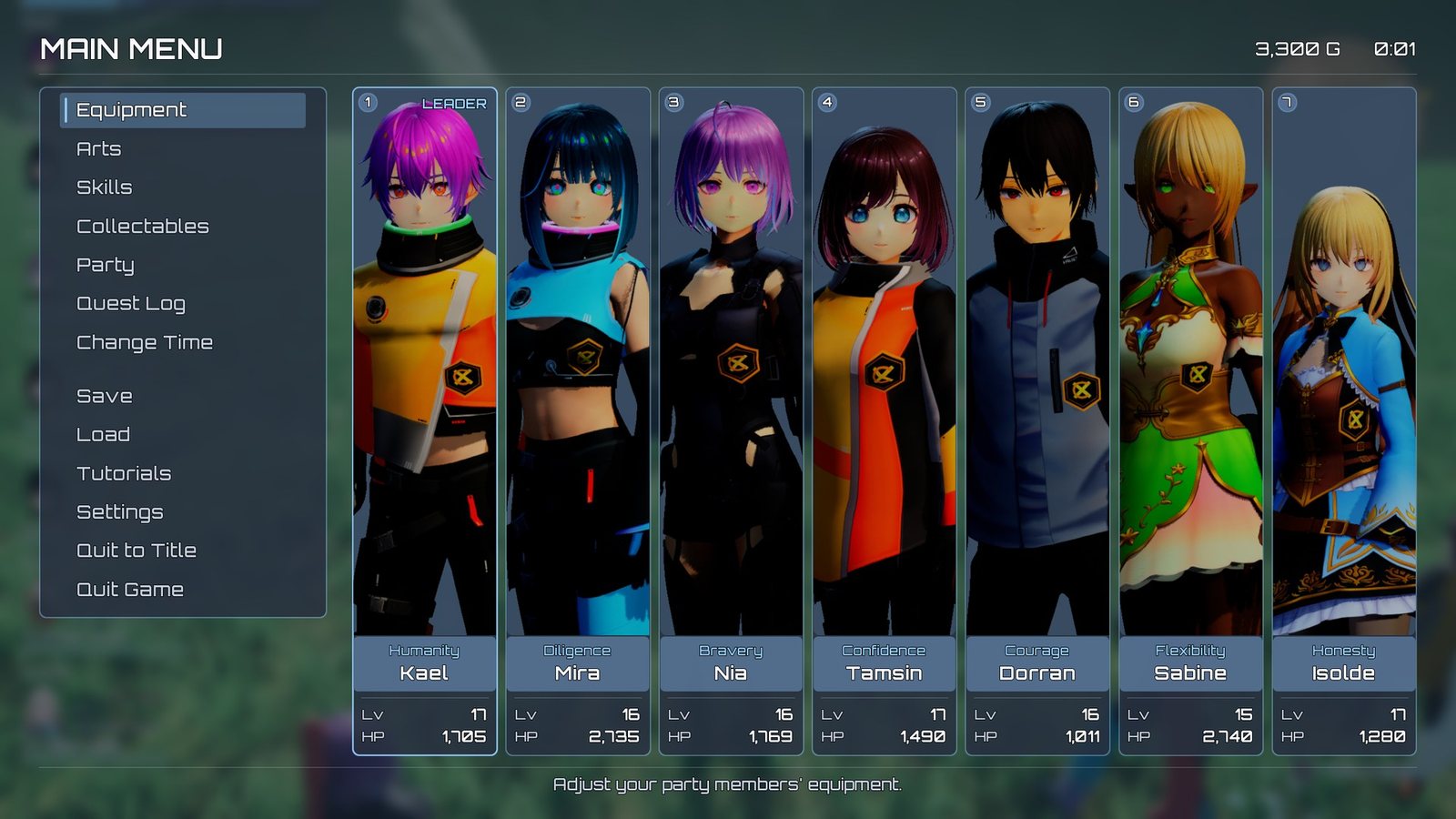
The main menu: entries on the left, one card per active party member.
What the player sees: during play, a HUD with the party's health plates, the minimap, the quest tracker, pickup badges and banners; in battle, the target plate and the Arts palette. The menu button opens an XC1-style main menu (entries on the left, a full-height card per party member) from which every other screen opens. Menus pause the game.
XenoCore's interface is built on Lyra's UI framework, CommonUI, and follows Lyra's look: clean, dark and restrained. Everything on screen falls into two groups. HUD plates sit over gameplay, take no input, and fade in and out. Screens are full menus; while one is up the game pauses and gameplay input switches off. The idea that makes the rest make sense: a HUD plate hides by fading its opacity, never by collapsing, and a screen owns the input while it is on top. Nearly every UI trap in this project is one of those two rules broken.
What you can change
- Restyle the menus: Restyle the menus.
- Add, reorder or hide a main-menu entry, or add a screen: Add a menu screen.
- Add something to the HUD: Add a HUD element.
- A yes/no question in a menu: Add a confirm popup.
- A button prompt on a screen: Add an input action with a button prompt.
- Replace any screen or HUD widget the game opens by itself: The two settings pages.
How it fits together
Lyra's root layout, W_OverallUILayout, holds a stack per layer tag. XenoCore uses three of them:
| Layer | What goes there |
|---|---|
UI.Layer.Game |
The HUD: UserInterface/HUD/W_XenoCore_HUDLayout |
UI.Layer.Menu |
Every XenoCore screen: the menu shell and its screens, quest offer, shop, trade, save, title, boot cards, tutorial cards |
UI.Layer.Modal |
Lyra's own full-screen confirmation dialog. XenoCore's popups deliberately do not use it |
A layer stack shows only its top widget, so pushing a screen onto the menu layer hides the one under it until the new one closes.
The HUD
Experiences/LAS_XenoCore_HUD, an action set used by B_XenoCore_Experience, adds:
W_XenoCore_HUDLayouttoUI.Layer.Game. It derives from Lyra'sLyraHUDLayoutand places the party member plates, the item pickup badges, the quest tracker, the quest reward banner, the level-up banner, the party join banner and the autosave badge.B_XenoCore_NumberPopComponentto the player controller, for damage numbers.
The layout also carries five empty extension points (Lyra's UIExtensionPointWidget), each
named by a tag. Lyra's Add Widgets action puts your own widget into one, so a new HUD element
needs no edit to the layout:
| Slot tag | Position | Stacking |
|---|---|---|
HUD.Slot.XenoCore.TopCenter |
Top centre, 48 px down | Column, centred |
HUD.Slot.XenoCore.TopRight |
Top right, below the minimap and its prompt | Column, right-aligned |
HUD.Slot.XenoCore.Center |
Screen centre | Overlaid |
HUD.Slot.XenoCore.BottomCenter |
Bottom centre, 48 px up | Column, centred |
HUD.Slot.XenoCore.FullScreen |
Whole screen, behind the rest of the HUD | Overlaid |
They are empty and let clicks through until something is added. See Add a HUD element.
The top-right corner holds the minimap (Minimap), and the full-screen L3 view (MinimapOverlay)
sits behind everything else. Both are widgets in the layout, not extension points. See
Minimap.
Other HUD elements are created by the systems that own them. The ones C++ creates by itself take their widget class from Project Settings › Game › XenoCore UI (see The two settings pages):
| Element | Created by | Class from |
|---|---|---|
| Target plate, player plate, Arts palette | The target mode ability, Battle/Targeting/GA_XenoCore_TargetMode |
The ability's Class Defaults |
"A Talk" prompt (W_XenoCore_InteractPrompt) |
The interaction system, drawn under the menu layers | Interact Prompt |
Dialogue box (W_XenoCore_DialogueBox) |
The dialogue anchor, a widget component drawn in screen space | The anchor's Box Widget Class, else Dialogue Box |
| NPC name plates, enemy and party overhead bars | Widget components on actors, drawn in screen space | The actor's Class Defaults |
Battle notifications (W_XenoCore_BattleNotify) |
The battle system | Battle Notify |
Loot panel (W_XenoCore_LootPopup) |
Opening a chest | Loot Popup |
| Damage-taken and heal numbers | The damage system | Damage Taken Numbers, Heal Numbers (Niagara systems) |
The menu
Input/Abilities/GA_XenoCore_ToggleMenu (the menu button, see
Controls) pushes UserInterface/W_XenoCore_MenuShell onto the
menu layer. The shell holds no hand-placed buttons: its Construct calls Build Menu In Panel
on its ButtonsBox, which makes one button per menu entry from Project Settings › Game ›
XenoCore UI › Menu Entries (plus any Additional Menu Entry Sets), sorted by Sort Order,
and focuses the first. It rebuilds every time the menu opens, which is what re-asks each entry's
Visible If condition.
The shell is laid out as Xenoblade Chronicles' main menu. Its parent class,
XenoCoreMainMenuBase, fills in everything except the buttons each time the menu opens:
- Party cards. One full-height card per active party member (up to seven), in party order with
the leader first. The row is divided into Card Slots (7) equal slots, so a full party fills the
screen and a smaller one keeps the same card width. A card shows the slot number, "Leader" on the first, the member's full-body
portrait, the skill tree they are learning, their name, a divider, then Lv and HP. The cards come
from Card Class on the shell's Class Defaults; the default,
XenoCorePartyCardBase, builds its own look. To restyle it, make a Widget Blueprint child ofXenoCorePartyCardBaseand name its partsPortraitImage,SlotText,LeaderText,BranchText,NameText,LevelValueTextandHealthValueText. A part you leave out is not drawn. - Portraits. The card draws the member definition's Menu Portrait, a full-body texture, and falls back to Portrait (the HUD bust) when it is empty. The seven sample members ship with one each. The card shows the top of it, from the crown down, filling the card's height: Portrait Crop on the card class (0.55, crown to hips) sets how much; 1.0 shows the whole body.
- Entries are
XenoCoreMenuEntryButtonrows, styled like the Party Tactics list. Change Menu Button Class in the settings to use your own button. Cards, entries and the shell share the tactics panel's colours (navy panel, blue rim, Orbitron), so the menu matches the HUD. - Gold and play time, top right (
GoldText,PlayTimeText). - Description, along the bottom (
DescriptionText): the highlighted entry's Description. - Intro. Each time the menu opens it fades in, the entry list slides in from the left and the cards rise in one after another. Timings and distances are under XenoCore > Intro on the shell's Class Defaults; untick Play Intro to turn it off.
- Groups. An entry with Starts Group set has a gap above it (Menu Group Gap in the settings, 20 px). The shipped list starts one at Save.
| Sort | Entry | Opens |
|---|---|---|
| 100 | Equipment | W_XenoCore_EquipmentScreen |
| 200 | Arts | Open Arts Screen action: the Arts Screen setting |
| 300 | Skills | Open Skills Screen action: the Skills Screen setting |
| 400 | Collectables | W_XenoCore_ItemMenu |
| 500 | Party | W_XenoCore_PartyManager |
| 600 | Quest Log | Open Quest Log action: the Quest Log Screen setting |
| 700 | Change Time | The C++ screen XenoCoreChangeTimeScreen: pick an hour, the screen fades and the clock jumps. See Time of day and weather |
| 800, 900 | Save, Load | Open Save Screen / Open Load Screen actions: the Save Screen setting, in Save or Load mode |
| 1000 | Tutorials | The C++ screen XenoCoreTutorialLogBase: every tutorial card seen so far, and the Tips on/off switch. See Tutorial cards |
| 1100 | Settings | Lyra's W_LyraSettingScreen |
| 1200, 1300 | Quit to Title, Quit Game | Return To Title / Quit Game actions; each asks first if there is unsaved progress |
An entry either pushes its Screen onto its Layer (empty means UI.Layer.Menu) and focuses
that screen's desired target, or runs its Action (a small Blueprint you make with
XenoCoreMenuAction as its parent). Entries with an Id are merged: a later entry with the same Id replaces
the earlier one. See Add a menu screen.
Lifecycle
Opening a screen. A screen is a Common Activatable Widget pushed onto UI.Layer.Menu. When
the menu layer shows anything, the game pauses and CommonUI switches to Menu input mode. The project's input config then filters every
gameplay mapping context out, so A cannot also jump behind a menu. See
Input and camera. The title screen opts out of the pause so its scene keeps
moving.
Back. B or Escape deactivates the top screen, but only if that screen sets Is Back Handler. Screens that must be answered (the loot panel, a quest that cannot be declined) take the back action and ignore it.
Closing. Deactivating pops the screen off its layer. When the menu layer is empty the game unpauses and gameplay input returns.
Pooling. CommonUI keeps a pushed screen and reuses the same instance next time. Anything that must be fresh per visit is reset every time the screen is shown, never once when it is built.
HUD plates (widgets whose parent class is XenoCoreHudPlateBase) are created once and stay. They slide and fade
in when created, Set Shown fades them in or out without removing them, and Play Outro fades
out and removes. A plate that must start hidden calls Begin Hidden from its own Construct.
Set Shown Immediate, Set Show Delay, Collapse All Except, Begin Hidden and Skip
Intro are all Blueprint-callable.
Plates built on XenoCoreHudPlateBase: player plate, target plate, Arts palette, battle
notification, quest tracker, quest reward banner, level-up banner, autosave badge.
Celebration bursts. The quest reward banner and the level-up banner each have a Celebration,
and the party join banner a Joined Effect: a UI Niagara burst (UserInterface/HUD/NS_XenoCore_QuestComplete,
NS_XenoCore_LevelUp, NS_XenoCore_PartyJoin) played behind the card, with its own System,
Size, Scale and Duration. Clear System for no burst. A paused game does not freeze
a burst. Unreal's shot screenshot command does not capture these bursts at all, so check them by
eye, or with a screenshot of the whole desktop.
Settings
| Setting | Where it lives | What it does |
|---|---|---|
| Show Hide Duration, Show Hide Offset | Any HUD plate › XenoCore › HUD | The show/hide fade time, and an optional slide |
| Intro Duration, Outro Duration, Intro Offset | Any HUD plate › XenoCore › HUD › Transition | The entrance and exit |
| Plate positions | W_XenoCore_HUDLayout |
Where each HUD element sits |
| Extra HUD widgets | An Add Widgets action with a HUD.Slot.XenoCore.* Slot ID |
Adds your widget to a HUD slot without editing the layout |
| Screens and HUD widgets C++ opens | Project Settings › Game › XenoCore UI | Replace the save, quest log, quest offer, shop, trade, Arts and Skills screens, the interact prompt, loot panel, battle notification, dialogue box and number systems |
| Menu entries, button class and padding | Project Settings › Game › XenoCore UI › Menu | What the in-game menu lists, in what order, and with which button |
| Dialogue anchor, beam material | Project Settings › Game › XenoCore Content | Non-UI assets C++ spawns |
| Escape Menu Class | W_XenoCore_HUDLayout |
What Escape and the pad's Select button open during play: W_XenoCore_MenuShell, the same menu as the menu button |
| Styles | UserInterface/Foundation/ |
Text styles, button styles, tab button, font colour materials |
| Action rows and their glyphs | UserInterface/Foundation/DT_XenoCore_Actions |
Named actions (Unequip, Delete, Sort...) that screens bind to show a button prompt |
| Item category icons | UserInterface/Foundation/DA_XenoCore_ItemIcons |
Icons per item category |
Style assets in UserInterface/Foundation/:
| Asset | Use |
|---|---|
TextStyle_XenoCore_TitleEntry, TextStyle_XenoCore_TitleEntrySelected |
CommonUI text styles for the title screen's entries |
ButtonStyle_XenoCore_Menu, ButtonStyle_XenoCore_TitleEntry |
CommonUI button styles |
W_XenoCore_TabButton |
Tab button for tab lists. Use it instead of Lyra's W_LyraButtonTab |
W_XenoCore_MenuButton, W_XenoCore_GlyphButton, W_XenoCore_ItemRow, W_XenoCore_StatBlock, W_XenoCore_StatRow, W_XenoCore_Rule |
Shared building blocks for screens |
The text styles use Lyra's Orbitron font (/Game/UI/Foundation/Fonts/Orbitron).
The stat block (W_XenoCore_StatBlock) draws a list of stat
rows. Show Lines and Show Header draw what you pass; Show Character and Show Item make
the block fill itself from a party member or an equipped slot and redraw when equipment changes.
Wrapping lists. Menu lists wrap from bottom to top. Ordinary panels wrap through their navigation rules. A List View cannot, so call Wrap List View once from the screen's Construct.
The two settings pages
Anything C++ opens or spawns by itself (a world subsystem or a static function has no asset of its
own to hold a class reference) is named on one of two pages in Edit › Project Settings › Game.
Both are saved to Config/DefaultGame.ini, and every entry starts at the shipped asset, so
nothing changes until you edit one.
XenoCore UI
| Category | Setting | Must derive from | Shipped |
|---|---|---|---|
| Screens | Save Screen | XenoCoreSaveScreenBase |
W_XenoCore_SaveScreen |
| Screens | Quest Log Screen | XenoCoreQuestLogBase |
W_XenoCore_QuestLog |
| Screens | Quest Offer Screen | XenoCoreQuestOfferBase |
HUD/W_XenoCore_QuestOffer |
| Screens | Shop Screen | XenoCoreShopScreenBase |
HUD/W_XenoCore_ShopScreen |
| Screens | Trade Screen | XenoCoreTradeScreenBase |
HUD/W_XenoCore_TradeScreen |
| Screens | Arts Screen | XenoCoreArtsScreenBase |
Arts/W_XenoCore_ArtsScreen |
| Screens | Skills Screen | XenoCoreSkillsScreenBase |
Skills/W_XenoCore_SkillsScreen |
| Screens | Gem Popup | XenoCoreGemPopupBase |
W_XenoCore_GemPopup |
| HUD | Interact Prompt | XenoCoreInteractPromptBase |
HUD/W_XenoCore_InteractPrompt |
| HUD | Loot Popup | XenoCoreLootPopupBase |
HUD/W_XenoCore_LootPopup |
| HUD | Battle Notify | XenoCoreBattleNotifyBase |
HUD/W_XenoCore_BattleNotify |
| HUD | Dialogue Box | should be XenoCoreDialogueBoxBase |
HUD/W_XenoCore_DialogueBox |
| HUD | Damage Taken Numbers, Damage Dealt Numbers, Heal Numbers | Niagara systems | HUD/NS_XenoCore_DamageNumbers_Taken, HUD/NS_XenoCore_DamageNumbers, HUD/NS_XenoCore_HealNumbers |
| HUD | Keyboard Key Icons | Lyra's keyboard controller data | Input/CommonInput_XenoCore_Keyboard |
| Items | Item Rarity Table, Rarity Pip Size, gem socket icons, tint, size and spacing | A XenoCoreItemRarityRow Data Table; textures |
Items/DT_XenoCore_ItemRarities, Items/T_XenoCore_GemSocketFilled, _Empty. See Set and style item rarity |
| Tutorials | Tutorial Table, Tutorial Card, Tutorial Enemy Near Distance, Tutorial Enemy Status Radius | A XenoCoreTutorialRow Data Table; XenoCoreTutorialCardBase |
Tutorials/DT_XenoCore_Tutorials; empty card = the native card. See Tutorial cards |
| Menu | Menu Entries, Additional Menu Entry Sets | Entries, and XenoCoreMenuEntrySet assets |
The thirteen entries above |
| Menu | Menu Button Class, Menu Button Padding, Menu Group Gap | A CommonUI button | XenoCoreMenuEntryButton, 4 px below each, 20 px before a group |
XenoCore Content
| Category | Setting | Shipped |
|---|---|---|
| Dialogue | Dialogue Anchor (must derive from XenoCoreDialogueAnchor) |
Characters/NPC/BP_XenoCore_DialogueAnchor |
| Feedback | Beam Material (the heal and buff light shaft) | Effects/Loot/M_XenoCore_LootBeam |
| Debug | Reaction Break / Topple / Daze Effect (for the XenoCore.Reaction command) |
GE_XenoCore_Reaction_Break, _Topple, _Daze |
The same page also holds Startup (starting roster and New Game map overrides, title music, fallback field and battle music), Dialogue Camera Rig, Battle (victory fanfare, the sounds an AI ally plays when hit), Voice, Items (the gem registry) and Critical Hit. Each is described on the page for its system.
The widget paths in the first table are under UserInterface/.
The fallback. If a setting is cleared, fails to load, or names an asset of the wrong class, XenoCore logs a warning and uses the shipped asset. A mistake costs the replacement, never the feature. The dialogue anchor falls back one step further, to the C++ anchor.
Fails silently in a packaged build: a replacement outside the cooked folders
A setting holds a soft reference, and the cooker does not follow soft references in project
settings. The shipped assets are cooked because Config/DefaultGame.ini always cooks
/XenoCore/UserInterface and /XenoCore/Characters/NPC, or because other cooked assets
reference them. Your replacement works in the editor,
and in a packaged build it is missing, so the game falls back to the shipped asset with nothing
on screen to say so. Add your folder to Project Settings › Packaging › Additional Asset
Directories to Cook (DirectoriesToAlwaysCook).
Silent traps
Fails silently: a plate that hides itself by collapsing never comes back
A Collapsed widget stops ticking, so it can never notice the condition that should show it again. HUD plates must hide with opacity: use Set Shown, never Set Visibility to Collapsed.
Fails silently: a popup without Is Back Handler closes the screen under it
Back falls through to the screen that asked the question, which closes and takes the popup with it. It looks exactly like "No" was pressed. Every popup must tick Is Back Handler.
Fails silently: text over a button swallows the pad's A
With the project's settings a pad's A is a simulated click at the centre of the focused widget. A text block or image drawn on top of a button, and hit-testable, takes that click instead. Set every widget layered over a button to Hit Test Invisible.
Fails silently: a Common Text Block with a style ignores its font
If a Style is set, it overrides Font and Color and Opacity. Clear Style before setting a font by hand, or set the font in a text style.
Enter and Space press the focused button
Config/DefaultGame.ini sets CommonUI's CommonButtonAcceptKeyHandling to TriggerClick, so
the keyboard's accept keys click the focused button, just as the pad's A does. A pad A press is
never handled twice: CommonUI's analog cursor takes it first, and only a press nothing handled
reaches the button.
Hovering is not focus
A button's On Hovered does not fire for keyboard or pad navigation. Anything that acts on "the selected row" must track On Focus Received as well.
Extending it
- Restyle: duplicate the styles you want into
Content/MyGame/UI/and point widgets at them. See Restyle the menus. - A new menu screen: make a Widget Blueprint whose parent is Common Activatable Widget (or a XenoCore screen base), set its input config to Menu, tick Is Back Handler, and add a Menu Entries row that names it. See Add a menu screen.
- Replace a shipped screen or HUD widget: duplicate it, keep its parent class, and point the matching XenoCore UI setting at your copy. See Restyle the menus.
- A yes/no popup: push it into the asking screen's own
OverlayStack, never onto the menu layer (that would replace the screen). From Blueprint, the Ask Confirm node does the whole thing withW_XenoCore_ConfirmPopupand continues on On Yes or On No. When a popup closes, give focus back to the row that asked. See Add a confirm popup. - A new HUD element over gameplay: add it to a
HUD.Slot.XenoCore.*slot with an Add Widgets action; give it the parent classXenoCoreHudPlateBaseif it should fade in and out. See Add a HUD element. - A button prompt on a screen: add a row to your own action table and bind it; see Add an input action with a button prompt.
Never edit Lyra's UI assets; copy what you need.
For programmers: classes
Plates derive from UXenoCoreHudPlateBase; the stat block is UXenoCoreStatBlockBase; menu
actions UXenoCoreMenuAction; the settings pages are UXenoCoreUISettings and
UXenoCoreContentSettings. The game pauses through AXenoCorePlayerController whenever
UI.Layer.Menu is non-empty. Widgets opened by systems with no asset of their own come from
UXenoCoreBattleNotifySubsystem, UXenoCoreLootPopupSubsystem,
UXenoCoreDamageNumberSubsystem and UXenoCoreInteractionSubsystem. From C++, a confirm popup is
UXenoCoreConfirmPopupBase::AskWithAnswer.
Why it's built this way
For programmers
- Lyra's look, not an imitation of a console RPG. XenoCore ships as a Lyra template, so a buyer expects an interface that belongs to Lyra. The layouts and information follow the genre; the chrome is Lyra's. XenoCore authors its own style assets in Lyra's idiom rather than pointing at Lyra's, apart from the font.
- Opacity, not visibility. HUD plates have two opacity drivers, the entrance/exit and the show/hide fade. They are multiplied through one function, so neither can erase the other.
- Pause by the layer, not by a screen. Pushing a sub-screen deactivates the shell, so a shell-scoped pause would resume the game under an open screen. "Is anything on the menu layer" is the question that matters.
- Menu input filtering, not ability blocking. Stopping gameplay input at the mapping-context level stops every action at once, including ones added later.
- Settings, not asset paths. A subsystem has no asset of its own to hold a class reference, so the widgets C++ opens used to be paths typed into the code, and swapping one meant editing the plugin. They are now project settings with a shipped default and a logged fallback, so a buyer swaps a screen without touching XenoCore, and a bad value cannot break the feature.
- Data-driven menu. Eleven hand-wired buttons meant every new screen was an edit to a shipped asset. An entry list merged by Id lets a plugin add, reword or hide entries from its own content.
- Rows built in C++. Lyra's list view drops null items without warning, so several XenoCore screens build their rows into a vertical box from C++, where what was built can be logged.