Items and inventory
All · 15 min read
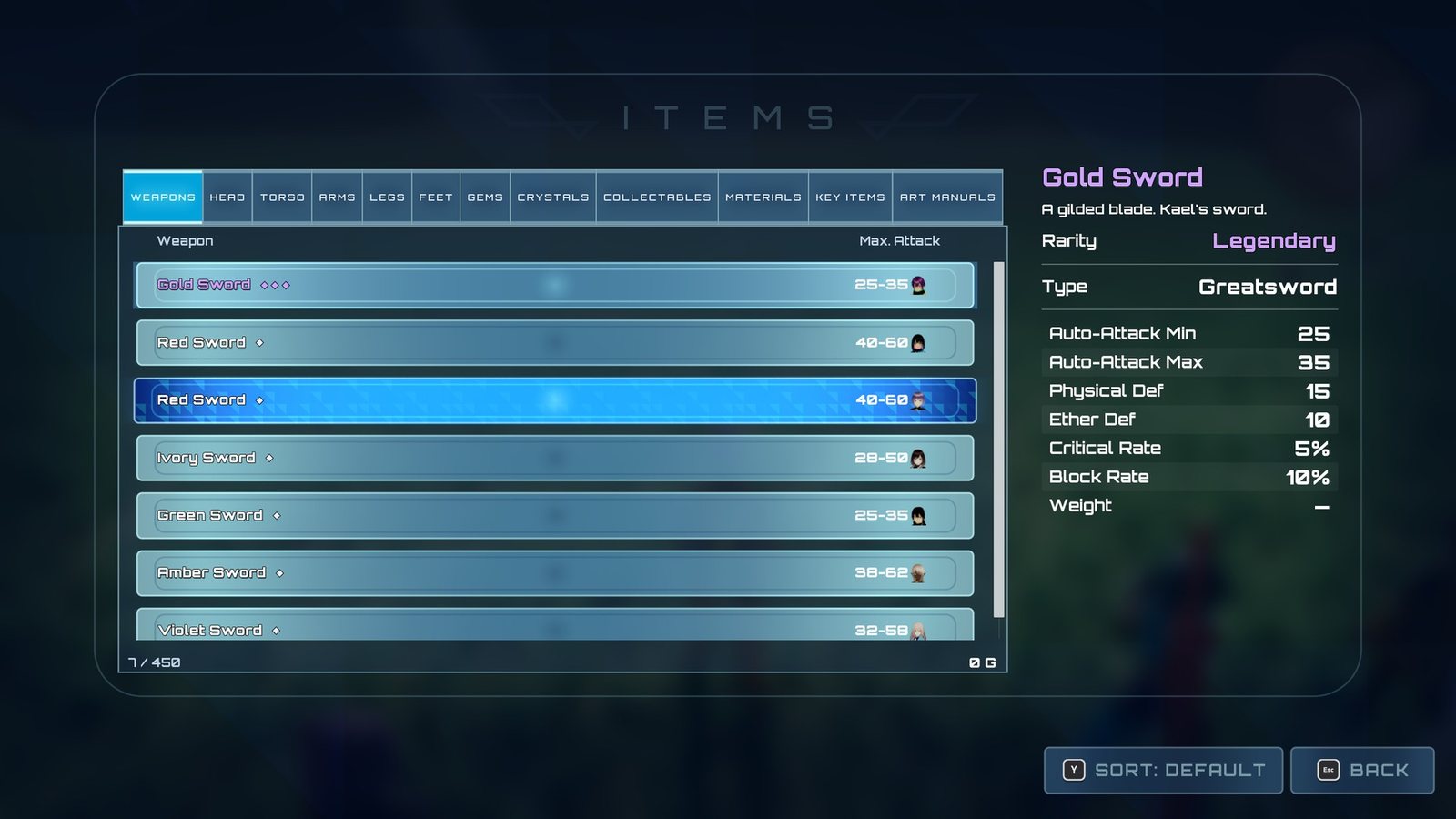
The Items menu, with rarity-coloured names.
What the player sees: one bag shared by the whole party. The Items menu sorts it into tabs (Equipment, Items, Collectables, Key, Gems, Crystals, Materials, Art Manuals), every item name is coloured by its rarity, an "Obtained" badge appears when something is picked up, and any character can equip from the bag.
An item is a small Blueprint (an item definition) whose Details panel holds a few fragments: blocks of settings for its menu tab, description, rarity, equipment slot and stats. Making an item is duplicating one that is close and changing those settings.
The one rule for Blueprints that give or take items: use the XenoCore inventory nodes (XenoCore › Inventory, such as Add Item To Party), not Lyra's. They keep every menu current, honour carry limits and never take an item someone is wearing.
What you can change
- A new consumable, material or key item: Consumable item.
- A new weapon or piece of armour: Add a weapon, Add armour.
- A gem: Add a gem.
- Rarity tiers and how they look: Set and style item rarity.
- Y-to-sort on a list: Add Y-to-sort to an item list.
- Category glyphs:
UserInterface/Foundation/DA_XenoCore_ItemIcons(see Settings). - What a new game starts with: Starting Inventory on a party member (see Equipment).
How it fits together
| Piece | Class / sample asset | Job |
|---|---|---|
| The bag | ULyraInventoryManagerComponent on the player controller, added by the plugin's Game Feature (XenoCore) |
Holds item instances |
| Finding the bag | Node Get Party Inventory (XenoCore › Inventory) | The only way to find the bag from a Blueprint |
| Item parent | Inventory/BP_XenoItemDefinition |
Parent Blueprint of the shipped items |
| Items | Inventory/Items/ID_XenoCore_*, Inventory/Armour/ID_XenoCore_*, Inventory/Gems/ID_XenoCore_Gem_*, Weapons/*/ID_XenoCore_* |
One Blueprint per item |
| XenoCore fragments | XenoCoreFragment_EquipSlots, XenoCoreFragment_ItemCategory, XenoCoreFragment_ItemDisplay, XenoCoreFragment_Gem |
Slots, weapon type and sockets; menu tab, carry cap and rarity; description and icon; what a gem adds |
| Lyra fragments | InventoryFragment_EquippableItem, InventoryFragment_SetStats |
What equipping spawns and grants; the item's stat numbers |
| Category icons | UserInterface/Foundation/DA_XenoCore_ItemIcons |
One glyph per category or slot for items with no icon of their own |
| Menus | UserInterface/W_XenoCore_ItemMenu, W_XenoCore_EquipmentScreen |
Browse the bag, equip from it |
| HUD | UserInterface/HUD/W_XenoCore_ItemBadge |
"Obtained" badge |
Fragments on an item
| Fragment | Settings | Notes |
|---|---|---|
XenoCoreFragment_ItemCategory |
Category, Max Carried, Sell Value, Sort Order, Rarity | Category picks the Items menu tab: Equipment, Items, Collectables, Key, Gems, Crystals, Materials, Art Manuals. Max Carried 0 = uncapped. Rarity is Common, Rare or Legendary; empty is Common. See Set and style item rarity |
XenoCoreFragment_ItemDisplay |
Description, Icon, Symbol, Symbol Colour | See the warning on Symbol below |
XenoCoreFragment_EquipSlots |
Allowed Slots, Equip Type, Weapon Type, Override Gem Slots, Gem Slots, Fixed Gems | Only on equipment. Empty means "not equipment". Equip Type is Light, Medium, Heavy or None. Weapon Type decides who may wield a weapon; the gem fields set its sockets. See Equipment |
XenoCoreFragment_Gem |
The gem's stat, rank and strength range | Only on gems. Its strength is rolled when the gem is created. See Equipment › Gems |
InventoryFragment_EquippableItem (Lyra) |
Equipment Definition | Only on equipment. See Equipment |
InventoryFragment_SetStats (Lyra) |
Initial Item Stats (tag → number) | Stats under XenoCore.Stat.*, such as XenoCore.Stat.PhysicalDefence |
An item with no category fragment falls back to Items. A non-equipment item such as
ID_XenoCore_EtherCrystal carries only the category and display fragments; a piece of armour such
as ID_XenoCore_BattleArmour carries all five.
Checks on save
Saving an item definition (an ID_ asset), or running Asset Actions › Validate Assets on it,
checks its fragments for setups that otherwise fail silently in play:
| Check | Result |
|---|---|
| An empty entry in the fragment list | Error |
| Equip Slots but no Equippable Item fragment, or no Equipment Definition on it | Error: the item would list in the swap menu and the click would do nothing |
| An Equippable Item fragment but no Equip Slots fragment, or no Allowed Slots | Error: the item could never be placed in a slot |
| A weapon with no Weapon Type | Warning: any character could wield it |
| Equipment whose Category is not Equipment | Warning: it shows on the wrong Items menu tab |
| No display name | Warning |
A gem with no Stat Tag, a Gem Id of 0, or Min Value above Max Value |
Error |
The results appear in the Message Log window and the Output Log.
Rarity
Xenoblade 3's model: Common, Rare and Legendary, drawn white, gold and purple with one to
three pips (UserInterface/Items/T_XenoCore_RarityPip) in every menu that names an item. Names carry
a thin dark outline and a soft shadow so a coloured name reads on a pale row, and every details pane
has a labelled Rarity row.
- Rarity is a property of the item definition. Nothing rolls it per drop, so the save format, quest counting and shop prices are unchanged. A Rare and a Common version of the same thing are two items, as in Xenoblade 3.
- What a rarity looks like is a row of
UserInterface/Items/DT_XenoCore_ItemRarities, set in Project Settings → XenoCore UI → Item Rarity Table. - Every screen colours names through the same rarity nodes (below), so no widget chooses a colour itself.
- Apply Item Rarity / Apply Item Instance Rarity colour a name and fill a pip box.
- Apply Item Rarity To Button does the same for a button labelled with Set Button Text.
- Prefix With Item Rarity gives "Rare · Heavy".
- A screen's own state colours win. An unaffordable row keeps its rarity colour, dimmed. A "(no room)" line stays red.
- Rarity changes no price, as in Xenoblade 3.
- A new game starts with one item of each tier in the leader's Starting Inventory.
Sorting
Pressing Y on the Items menu or the equipment swap list cycles the list's order. The Items menu offers Default, Rarity, Name, Value and Most Recent. The swap list offers Default, Stat (Attack or Physical Def), Rarity, Name and Most Recent.
Each screen carries a UserInterface/Foundation/W_XenoCore_ItemSortControl, a placed widget that owns the Y prompt and
re-sorts the list in place. Its Sort Items node sits between Get Items For … and Set List
Items, so each list opens already sorted.
See Add Y-to-sort to an item list. The shop and trade screens have their own sort, through the merchant base.
Lifecycle
Where the bag comes from. The plugin adds Lyra's inventory component to the player's controller. Get Party Inventory always returns that bag, whichever character asks. Do not look for a bag on an AI party member's controller: it is not the party's.
Starting contents. Each character's equipment component adds its Starting Inventory (loose items) and then its Starting Equipment (items it immediately wears) to the party bag when the character's ability system is ready. See Equipment.
One entry per item. Twelve Ether Crystals are twelve entries in the bag. Quantity is counted, not stored: Get Party Item Count counts entries. A list still shows "Ether Crystal x12"; only the storage is one per item.
Adding and removing. Always through the statics:
| Node | What it does |
|---|---|
| Add Item To Party (Item Def, Count) | Adds up to Count, honouring Max Carried. Returns how many went in |
| Add One Item To Party | Adds one and returns the new instance, or null if the cap left no room |
| Remove Item From Party (Item Def, Count) | Removes what is there, up to Count, and returns how many went |
| Get Party Item Count | How many of a definition the party holds |
| Is Item Equipped By Anyone, Find Equipment Holding | Whether, and by whom, an instance is worn, asked across the whole party |
| Find Free Item By Definition | A copy of an item that nobody is wearing |
| Get Free Party Item Count | How many of a definition the party holds that nobody is wearing: what can be spent or sold |
| Remove Item Instance From Party (Item) | Removes that exact item. Refuses and returns false if someone is wearing it or it is not in the bag |
| Consume Items From Party (Item Def, Count) | Spends exactly Count, or nothing at all. Returns false, removing nothing, when fewer than Count are free. Never takes a worn item |
All of these are under XenoCore › Inventory. Every add and remove broadcasts XenoCore.Inventory.Message.Changed with the item definition, the
new count and the change (positive gained, negative spent). A change of zero broadcasts nothing.
Open menus, the item badge and quest counters listen for it. Chests and collectable orbs add
through the same functions, so they update everything too.
Changes made another way. XenoCore compares the bag with what it last saw every frame (paused
menus included). When something other than the XenoCore nodes changed it (Lyra's own inventory nodes, or Lyra's pickup interface), it broadcasts the same
change message on that change's behalf and logs a line to LogXenoBagWatch: "The party bag changed
outside the XenoCore inventory functions (+1 ...); announcing it on their behalf." So menus stay
current. What it cannot do is undo a change: see the warnings below.
Items as an ability cost. An ability that spends items (a potion, an Art Manual) uses the Party Item (XenoCore) cost in its Additional Costs list. Set Item Definition and Quantity (a scalable float keyed on ability level; fractions round down). The ability cannot activate unless the party holds that many copies nobody is wearing, and it spends them through Consume Items From Party, so the change message fires. The cost looks up the party bag whoever casts, including an AI party member.
Equipped state. An item in the bag may be worn by one character in one slot. The bag does not move items when they are equipped; the equipment component only points at them.
Settings
| Setting | Where it lives | What it does |
|---|---|---|
| Display Name | Item Blueprint › Class Defaults (Lyra) | The name shown everywhere |
| Fragment settings | Item Blueprint › Fragments | See the table above |
| Category Icons | DA_XenoCore_ItemIcons › XenoCore › Inventory |
Glyph per category. An unmapped category draws no icon, never a default |
| Slot icons | DA_XenoCore_ItemIcons |
Glyph per equipment slot, for the merchant tabs |
An item's own Icon wins over the category glyph. None of the shipped items sets one, so every
icon you see in the sample comes from DA_XenoCore_ItemIcons.
Lyra's Remove Item Instance can take an item someone is wearing
Lyra's Remove Item Instance removes the item you give it even if a character is wearing it.
The character keeps showing it in its slot, but the bag, and therefore the save, no longer holds
it. The watcher cannot put it back; it logs an Error to LogXenoBagWatch naming the item and
the wearer. Use Remove Item Instance From Party, which refuses. The same risk applies to
Lyra's Consume Items By Definition, which takes the first entries it finds; use Consume Items
From Party.
Lyra's Add Item Instance crashes
Lyra's Add Item Instance node is not implemented in stock Lyra and stops the editor or the game when it runs. There is no way to put an existing item instance back into the bag. Add by definition with Add Item To Party instead.
Fails silently: Lyra's Inventory Item cost never lets the ability run
Lyra's own Inventory Item ability cost is switched off inside stock Lyra 5.8, so its check always fails and an ability carrying it can never activate. Nothing is logged. Use Party Item (XenoCore) instead.
Fails silently: Symbol draws as a box
Symbol on the display fragment is authored as text, and the UI font only covers Latin letters and basic punctuation. Anything else draws as a missing-glyph box. Use Icon or the icon set instead.
Extending it
- A new item: duplicate a shipped item of the same kind into your own folder
(
Content/MyGame/Items) and change its fragments. See Consumable item, Add a weapon and Add armour. - A new equipment item must be duplicated, never created blank: a blank definition has no equipment definition, so it lists but cannot be equipped, and nothing is logged.
- A new category (Items menu tab) needs a programmer: the list of tabs is fixed in C++. See the note below.
- Something that gives items (a quest reward, a shop, a script) should call Add Item To Party so the change message fires.
- Reacting when the bag changes: listen for the
XenoCore.Inventory.Message.Changedmessage. See Events. - Never rename or delete the fragments on shipped items in place; duplicate first.
For programmers: classes and adding a category
The bag is a stock ULyraInventoryManagerComponent on the player controller, found by
UXenoCoreInventoryStatics::GetPartyInventory. Every bag change goes through
UXenoCoreInventoryStatics; changes made elsewhere are caught by
UXenoCoreInventoryWatchSubsystem. Rarity colouring is UXenoCoreItemRarityStatics, the item
cost is UXenoCoreAbilityCost_PartyItem, and the message payload is
FXenoCoreInventoryChangedMessage. A new category is a value appended to EXenoCoreItemCategory
(XenoCoreItemFragments.h): append at the end, never reorder or insert, because saved items
store the number.
Why it's built this way
For programmers
- One entry per item because Lyra counts entries.
GetTotalItemCountByDefinitionadds one per entry and never readsStackCount, andConsumeItemsByDefinitionremoves one entry per unit. Merged stacks would make Lyra's counting under-report and break item ability costs. Lyra knowledge a buyer already has stays correct. - The bag on the controller because Lyra's inventory consumers, such as the quick bar, look for it there, and because the party, not a character, owns it. The controller survives switching the leader.
- One resolver because "which bag" has one right answer in single-player, and writing that assumption down in exactly one function means only that function changes if it ever stops being true.
- Our own change message because Lyra's
Lyra.Inventory.Message.StackChangedis only sent from replication callbacks, which never run in a standalone single-player game. - A watcher as well as a rule. Designers reach for Lyra's inventory nodes, because they are the first ones the node menu offers. The watcher keeps menus current when that happens; it is cheap because an untouched bag compares equal in one pass. It is a net under the rule, not a replacement: only the statics honour carry caps and refuse worn items.
- Our own item cost because Lyra's is compiled out, and even restored it would look for the bag on the casting character's own controller (wrong for an AI party member) and could spend a worn item.
- Fragments in C++ because C++ cannot read variables defined on a Blueprint class, so data that both menus and gameplay code need has to live on a native fragment.