Party tactics
Designer · 10 min read · No code · Last tested: 2026-10-04
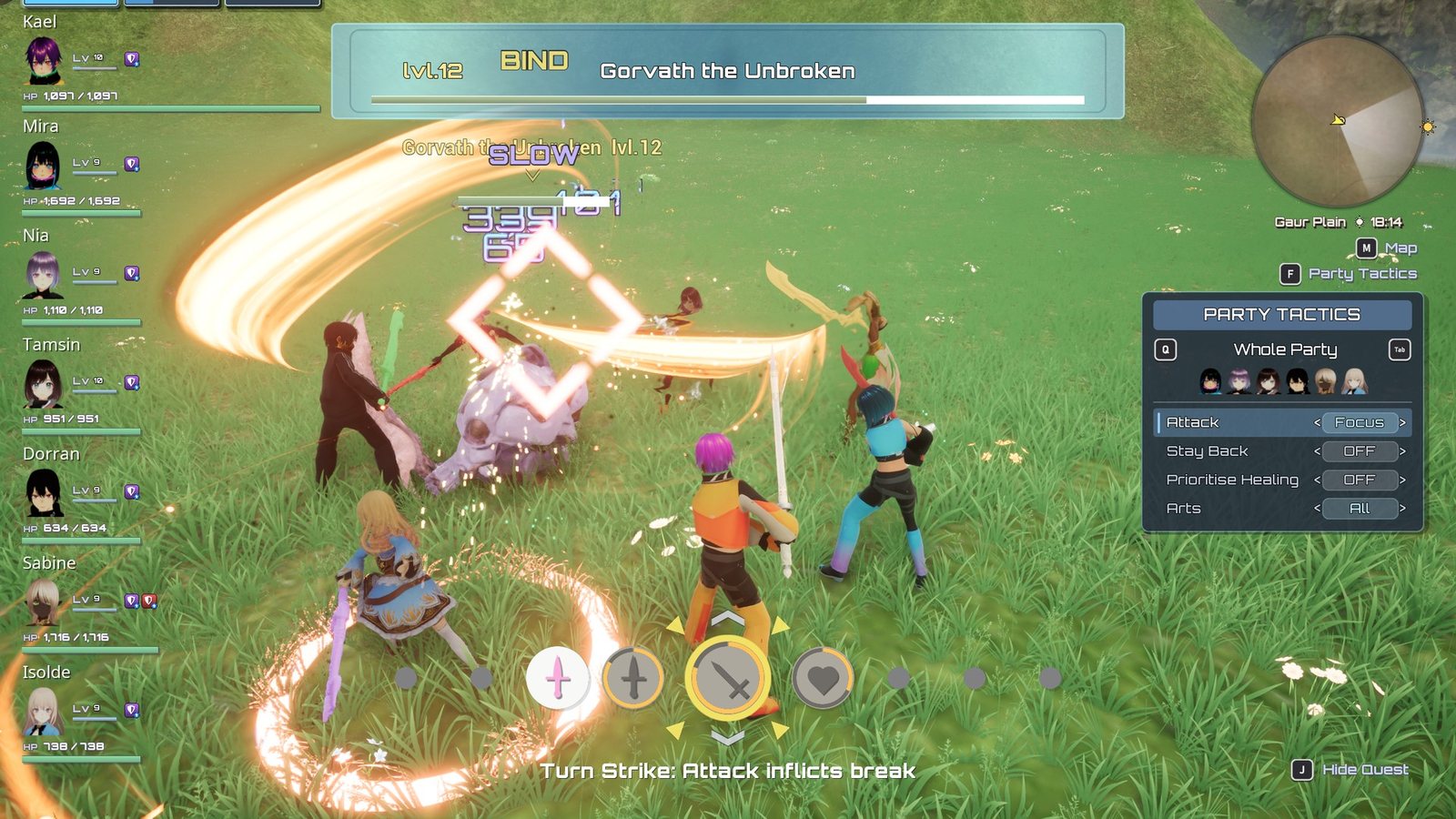
The Party Tactics panel, opened mid-fight.
Tactics are standing orders for the companions: who they attack, and how they use their arts. The player sets them at any time, in the field, locked on or mid-fight. They stay set until changed, and they are saved with the game. Orders can be given to the whole party or to one member, as in Xenoblade Chronicles X.
At a glance
In play: tap X (F) to switch the party between fighting your target and picking their own; hold it for the full list of orders.
What you can change, no code: the starting orders, which tactics the list shows and their wording, and how a companion picks a target on At Will. See What you can change and Tune companion AI.
| Control | Pad | Keyboard |
|---|---|---|
| Switch Attack between Focus and At Will for the whole party | Tap X | Tap F |
| Open the Party Tactics list (open while held) | Hold X | Hold F |
| ...move the highlight | D-pad Up / Down | Up / Down |
| ...change the highlighted tactic's value | D-pad Left / Right | Left / Right |
| ...give the orders to the next / previous member | RB / LB | Tab / Q |
While an NPC's prompt is offering Trade, X is Trade instead. The prompt on screen shows which.
                                [M] Map
                      [X] Party Tactics     <- always shown
                     Focus · Heal First     <- shown for a few seconds, then fades

            PARTY TACTICS                   <- the list, while X is held
  [LB]      (portrait) Mira      [RB]
  ------------------------------------
  | Attack              < Regroup >
    Stay Back           < PARTY  >
    Prioritise Healing  < PARTY  >
    Arts                < PARTY  >
Under the minimap's [M] Map, in the same style, the hint [X] Party Tactics is always on screen, so the button is never a secret. The party's orders appear on a card below it for a few seconds and fade, rather than cluttering the HUD - when they change (a tap of X, or closing the list), when a battle starts, and once when the game loads. The card wraps to the minimap's width and only ever breaks between two orders. The battle line over the leader also announces every change, as XC1's group commands do. The list appears only while X is held, sized to its longest row. No text in it scrolls.
The tactics
| Tactic | Values | Series |
|---|---|---|
| Attack | Focus: the leader's target. At Will: each companion picks its own (see below). Regroup: stop attacking and gather by the leader, weapons drawn - the leader fights alone until it is changed | XC1 Focus attacks! / Engage at will! / Come to me!; XC3 Focus Attacks and Follow Leader |
| Stay Back | OFF / ON: hold a distance from the target and fight with what reaches from there - heals, buffs, long arts. With swords only, a member on Stay Back mostly heals and supports | XCX Use ranged attacks! |
| Prioritise Healing | OFF / ON: heal arts become eligible sooner and outscore attack arts | Ours; no Xenoblade tactics list has one |
| Arts | All: every art. No Talent: never the Talent Art, so the gauge stays full. Auto Only: no arts at all, heals included | No Talent: ours, XCX's Keep your tension up! is the nearest. Auto Only: XCX Assemble! behaviour |
Attack and Arts are one tactic each with three values because their answers exclude each other: a companion told to follow you cannot also be focusing your target, and one on auto-attacks only is already holding its Talent Art. The default is Attack: Focus, Arts: All, everything else OFF.
One member's orders
Pressing RB while the list is open moves it from Whole Party to the first companion, shows their portrait, and puts a white ring under them. On a member's list every tactic has one extra value, PARTY: "same as everyone". Stepping a tactic away from PARTY gives that member their own order; stepping it back to PARTY hands it back to the party.
Changing a tactic for the whole party clears every member's own order for that tactic, so "everyone" always means everyone.
Who a companion attacks on At Will
Each companion scores every enemy fighting the party and takes the best. Only enemies already in the fight count: as in every Xenoblade, companions never start a battle themselves - and with squads that link aggro, one that did would pull the whole squad onto you. The weights are on the character's AI Profile › Target Choice (party member definition), so a defender and a healer can choose differently:
| Field | Default | Effect |
|---|---|---|
| Attacking Me Weight | 3 | Fight whatever is attacking this character |
| Attacking Ally Weight | 1.5 | Peel enemies off the rest of the party. Raise on a defender |
| Leader Target Weight | 1 | Lean toward the player's fight |
| Current Target Weight | 2 | Stick with the current target rather than flip-flop |
| Per Ally On Target Weight | -1 | Each other companion already on an enemy makes it less attractive, which spreads the party |
| Distance Penalty Per Metre | 0.1 | Prefer the nearer enemy |
| Target Reconsider Interval | 1 s | How often the choice is re-made; a dead target is replaced at once |
What you can change
Everything is on the party component: open Characters/Party/BP_XenoCore_Party, click Class
Defaults, and look under XenoCore › Party › Tactics:
| Property | What it does |
|---|---|
| Default Tactics | The orders a new game starts with |
| Tactic Info | Per tactic: its Label and Description, and its Values in order - each with its own label on the list, battle line, word in the orders under the prompt (empty = not shown) and colour - plus a sound |
| Tactics List | Which tactics the list shows, top to bottom. Leave one out to hide it |
| Heal First Threshold / Heal First Bonus | How early, and how strongly, Prioritise Healing heals (70%, +3) |
| Stay Back Distance | How far from its target a Stay Back member holds (750 cm - past every melee art and the auto-attack). Each member holds on its own side of the target, so several spread round it |
| Regroup Ends With Battle | Turn every Attack: Regroup back to Focus when a fight ends. Off by default: orders stand |
| Follow Party Line | The battle line when a member goes back to PARTY |
| Tactics Panel Class | The widget that draws the prompt and the list. Set a Blueprint child of XenoCoreTacticsPanelBase to restyle it |
The panel widget's own Details hold its look: Tactics › Layout (position, minimum width, portrait sizes, fade and slide), Prompt (the hint on or off, the orders card's width, how long it shows and its fade, which moments show it - a change, a battle start, a load - and Always Show Prompt to keep the card up), Text (fonts, their shared Font Family, and every word it prints) and Colour (accent, rim, shadow, header band, value pills, highlight). A child that authors its own widget tree keeps it, and gets On Tactics Refreshed after every change to draw from.
The glyphs - X on the prompt, LB / RB on the list - are the rows PartyTactics,
TacticsScopePrev and TacticsScopeNext in DT_XenoCore_Actions (the panel's Action Table,
drawn with its Glyph Class, Lyra's InputActionWidget). Glyph Class, Action Table and
Font Family are soft defaults on the class: they load when the panel is first built, and a
Blueprint child can point them elsewhere.
Fails silently: remapping the tactics button
The glyph rows store their own keys; they are not read from the input mapping. If you rebind
the tactics input in Input/Mappings/IMC_XenoCore, also open
UserInterface/Foundation/DT_XenoCore_Actions and change the PartyTactics,
TacticsScopePrev and TacticsScopeNext rows' keys to match, or the prompt keeps showing
the old button.
The buttons are Blueprint children of XenoCoreGameplayAbility_PartyCommand in /XenoCore/Input/Abilities
(GA_XenoCore_PartyTacticFocus, ..._PartyTacticsPanel, ..._TacticsScopeNext/Prev). The tap's
Tactic, Value A and Value B say what it flips between; to put another tactic on its own button,
duplicate it, change those, and map an input to it.
Fails silently
A tactic that is not in Tactics List cannot be changed from the list, and nothing says so. It still works if a button or a Blueprint sets it (Set Tactic on the party component).
If companions stand around while you fight
Hold X and look at Attack. On Regroup they are doing what they were told - set it back to Focus. Orders are saved with the game, so a Regroup set once comes back with the save.
Testing
After changing tactics, the companion AI or an art's AI settings, start a fight in
Maps/L_XenoCore_Gym and set each value in turn from the list (hold X / F). Watch what the
companions do: who they target, whether they swing, how far from you they stand, which arts they
use and whether a hurt ally is healed. log LogXenoAI Verbose in the console prints every art
decision (see Companion AI).
Saving
Tactics are saved by name - "Attack: AtWill", never a number - so tactics and values can be reordered or added without breaking a save. Each member's record holds only the orders they do not take from the party. A save made before tactics existed loads Default Tactics.
For Blueprint
Get Tactic Value, Get Attack Order, Is Tactic On, Set Tactic, Toggle Tactic,
Clear Member Tactic and Clear Member Tactics on the party component take an optional member
definition (empty = the whole party). Every change is broadcast on XenoCore.Party.Message.TacticChanged.